
Descripción
Creates a new widget to easily add mailing lists to a Genesis website. Recommended plugin in virtually all Genesis theme tutorials. The widget allows the site administrator to set either the Feedburner ID or form action, e-mail form field and hidden fields to mimic the subscribe form of other mailing list services.
Thanks
A special thanks to all who have contributed to Genesis eNews Extended.
Financial Donations
- Joe Taylor
- Dorian Speed
- Paul Meyers
- Joel Runyon
- Jennifer Jinright
- Greg Ferro
- Greg Young
Code Contributions
- Gary Jones (many, many times over)
- Mike Hemberger
- John Levandowski
- David Decker
- Kim Parsell
- Erick Nelson
- Nick Davis
- Maor Chasen
Translations
- David Decker (German)
- Branco Radenovich (Slovak)
- Marco Galasso (Italian)
- Ryan Sullivan (Spanish)
- Paul de Wouters (French)
- Diane S (Serbian)
- Daniel Bailey (Bulgarian)
- Gary Jones (British English)
- Fabiana Simões (Portuguese-Brazil)
StudioPress
- Special thanks to Brian Gardner and the team at StudioPress who wrote the original code that provided the foundation for the plugin.
If you’re not listed and think you should be, please drop me a note. Any omission is, in no way, intentional.
Capturas
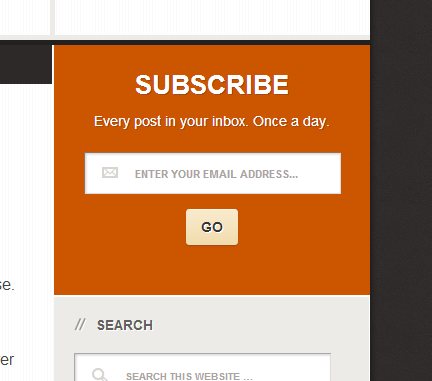
Example of the plugin in use on a site running Streamline 2.0. 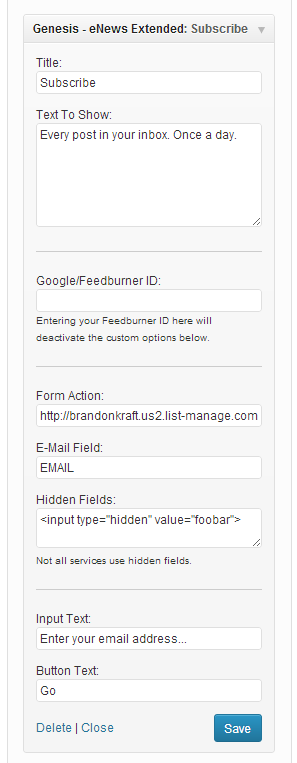
Widget setting screen.
Instalación
- Activate the plugin through the ‘Plugins’ menu in WordPress
- In Appearance->Widgets, add Genesis eNews Extended widget to any sidebar.
- Using the mailing list contact form code provided by your vendor, add the form action URL, the form field ID for the e-mail field and any hidden fields (not all services use them) into the widget options. See some tips for this on the plugin’s install page.
- If using name fields, read the plugin’s tutorial website.
- Verify it works!
FAQ
-
What services work with this plugin?
-
Feedburner, MailChimp, Aweber, FeedBlitz, ConvertKit, and Constant Contact are confirmed to work, but it should work with almost all services. If you have tested this with other services, please contact me
-
How do I get the privacy policy link to show? The checkbox isn’t working.
-
Genesis eNews Extended uses WordPress’ built-in privacy policy setting. Be sure you have a privacy page set at wp-admin/privacy.php .
-
The “Opens in Same Tab” option doesn’t work with FeedBurner. What’s wrong?
-
That is intentional. You don’t want to knock people off your site and leave them on FeedBurner’s.
-
The first and last name fields look funky.
-
Read more on the plugin’s tutorial website.
-
I need help! Where I can get it?
-
“Official” tutorials will be maintained on the plugin’s website.
Questions can be asked at the WordPress.org Support Forum for this plugin.
Reseñas


Colaboradores y desarrolladores
«Genesis eNews Extended» es un software de código abierto. Las siguientes personas han colaborado con este plugin.
Colaboradores
«Genesis eNews Extended» ha sido traducido a 13 idiomas locales. Gracias a los traductores por sus contribuciones.
Traduce «Genesis eNews Extended» a tu idioma.
¿Interesado en el desarrollo?
Revisa el código , echa un vistazo al repositorio SVN o suscríbete al registro de desarrollo por RSS.
Registro de cambios
2.2.0
- Adds “enews-{$field_count}-field” classes to form to aid in additional styling. See https://github.com/kraftbj/genesis-enews-extended/pull/152
Props to JiveDig for the contribution.
2.1.4
- Accessibility: Use aria-label instead of to prevent CSS being either over-agressive or not enough.
2.1.2
- Accessibility: Updates to be implicit to eliminate duplication when multiple instances are used on a page.
- Coding Standards: Implement WPCS.
2.1.1
- Remove comment that was displaying on the front end.
2.1.0
- Provide option to link to the site’s Privacy Policy.
- Allow “a” HTML tags in the hidden fields settings field.
- Various improvements to match coding standards.
2.0.2
- Fixes minor issue that led to HTML validation issues.
- Fixes PHP notice for checking non-existent variables in some cases.
2.0.1
- Corrects typo impacting Last Name field text placeholder.
2.0.0
- Add filters for text before and after form.
- Fixed form name to be valid HTML 4.
- Use https with Feedburner to prevent mixed content warnings on HTTPS sites.
- Minor code fix when MailPoet is not present.
- Adds
genesis-enews-extended-argsfilter to allow plugins to manipulate the widget settings prior to output. - Uses HTML 5 placeholders instead of JavaScript.
- Form ID now uses unique value.
1.4.1
- Add fieldset, legend, option, optgroup, select to allowed HTML for Hidden Fields area.
- Update CSS for screenreaders. Props jwenerd.
- Updated BG transations. Props Daniel Bailey.
1.4.0
- Adds MailPoet itegration. Props Maor Chasen.
- Updated pt_BR translation and added en_UK translation. Props Fabiana Simões and Gary Jones.
- Minor code improvements. Props Gary Jones.
1.3.3
- Updated Bulgarian translation. Props Daniel Bailey.
1.3.2
- Remove type hints to prevent error when strict reporting used in PHP 5.4
1.3.1
- Minor code improvements.
- Updates HTML5 option for late Genesis 2.0 changes. Props Nick Davis.
1.3.0
- Adds option for HTML5-enhanced forms.
- Adds error checking for including http://feeds.feedburner.com in the Feedburner ID field.
- Minor code improvements
- Listing of issues resolved in this version.
1.2.0
- Adds text space after form. Perfect for a link to a Privacy Statement!
- Code cleanup. Thanks to Kim Parsell for reporting.
- Adds labels to form elements to make it compatible with screen readers for the visually impaired.
- Adds Serbian Translation. Props to Diana S.
- Listing of issues resolved in this version.
1.1.2
- Improved French translation. Props to Paul de Wouters.
- Improved German translation. Props to David Decker!.
- Enables mail service validation of name fields by clearing default text onsubmit.
1.1.1
- Fixed bug with incorrect escaping function used in first and last name fields.
- Fixed bug with some translations not working.
1.1.0
- Allows for more HTML tags to be used in Text to Show field. Dropped genesis_allowed_tags in favor or wp_kses_post. Props to John Levandowski.
- eNews Extended now compatible with Catalyst theme (Catalyst not officially supported).
- Fuzzy translations added for a wide number of languages based on Genesis 1.8.2 translations of the original eNews Widget.
1.0.X
- Adds ability to edit “First Name” and “Last Name” displayed on front-end.
- Security update and other code cleanup.
- Version numbering now using semver.org rationale.
0.2.0
- Various code enhancements to improve performance and adhere better to WP standards. Props to Gary Jones
- Adds Spanish translation. Props to Ryan Sullivan
- Adds Italian translation. Props to Marco Galasso
- Adds Slovak translation. Props to Branco Radenovich
0.1.6
- Makes available first and last name fields.
0.1.5
- Adds option to open confirmation window in same tab.
0.1.4
- Adds l18n support for other languages, props to David Decker!
- Adds German translation , props to David Decker!
0.1.3
- Adds Feedburner support in anticipation of Genesis 1.9
- Security and translation updates
0.1.2
- Modifies class name to work with more StudioPress themes.
0.1.1
- Adds “Hidden Fields” widget setting to make widget compatible with more mailing services.
0.1
- Inital release.