
Descripción
WPLP Cookie Consent helps WordPress website owners display cookie consent banners, manage user preferences, and control third-party scripts in line with major privacy regulations such as GDPR, CCPA/CPRA, ePrivacy, LGPD, POPIA, PIPEDA, and similar frameworks.
The plugin is designed to be easy to configure while offering the controls needed to understand and manage cookies used on your website.
Customizable Cookie Consent Banner
You can configure the cookie banner to match your website’s design and consent requirements.
Available options include:
-
Multiple banner layouts and positions
-
Customizable text, colors, and button labels
-
Category-based consent for analytics, marketing, and functional cookies
-
Optional explicit accept or reject actions
-
Display banners based on visitor location where applicable
🔗Learn More About WPLP Cookie Consent
Cookie Scanning and Detection
WPLP Cookie Consent includes a built-in cookie scanner that detects cookies and third-party services used on your website.
The scanner helps you:
-
Identify cookies and scripts added by common service
-
Group cookies by category for clearer disclosure
-
Keep cookie information updated as your site changes
Detected cookie details can be used to inform your cookie policy and consent configuration.
Automatic Script and Content Blocking
The plugin can prevent certain third-party scripts from loading until user consent is provided.
This includes commonly used services such as:
-
Analytics tools
-
Advertising and marketing scripts
-
Embedded media and social content
Script blocking works with scripts added directly, through plugins, or via tag managers. Support for Google Consent Mode v2 is included, allowing Google services to adjust behavior based on consent signals.
Smart Embed Control
Third-party content such as videos, maps, or social embeds can be blocked until consent is given.
When content is blocked:
-
Placeholders are displayed instead of loading external resources
-
Visitors can choose to enable content by providing consent
-
Placeholder behavior can be configured from the admin area
Consent Records
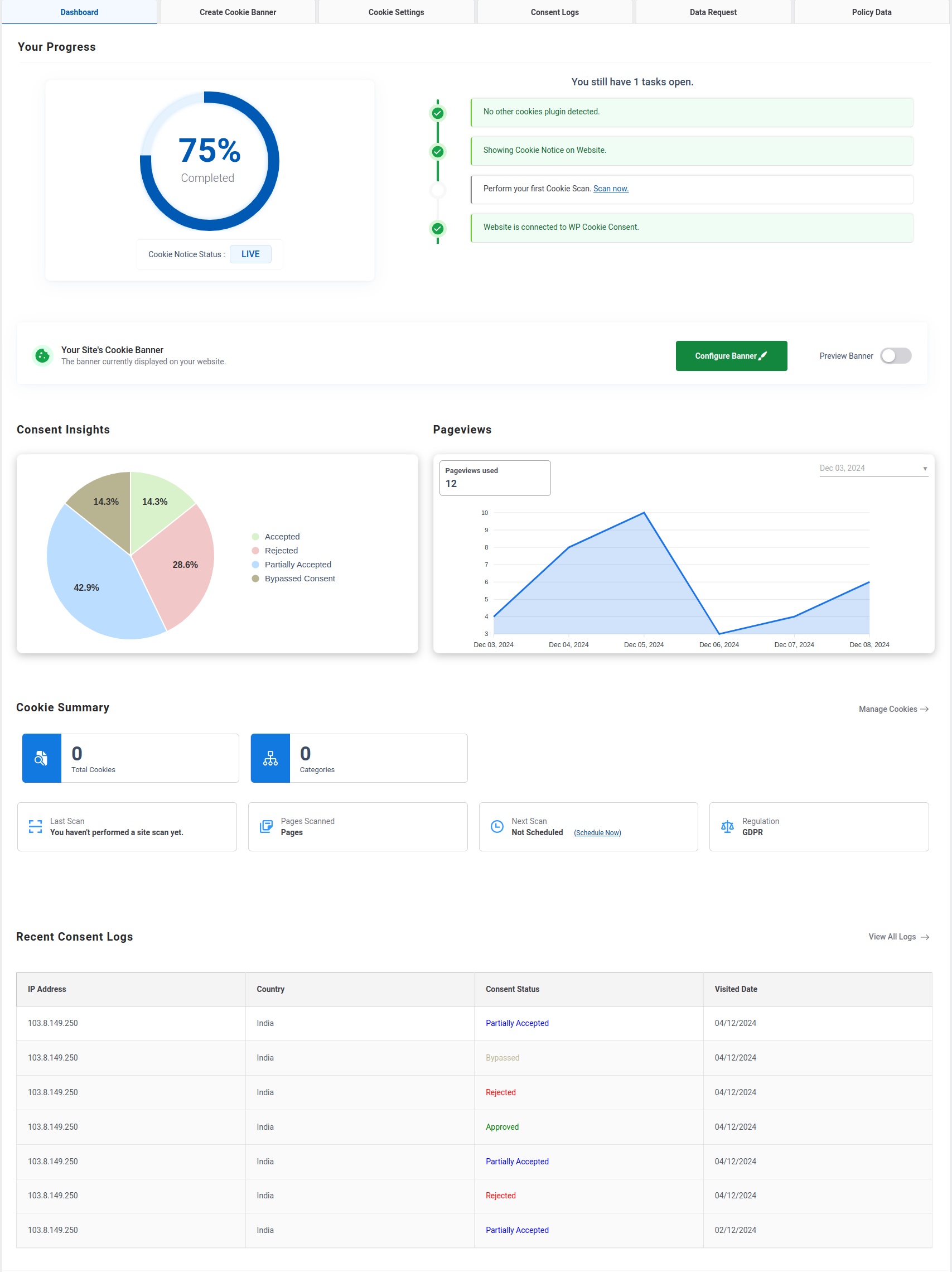
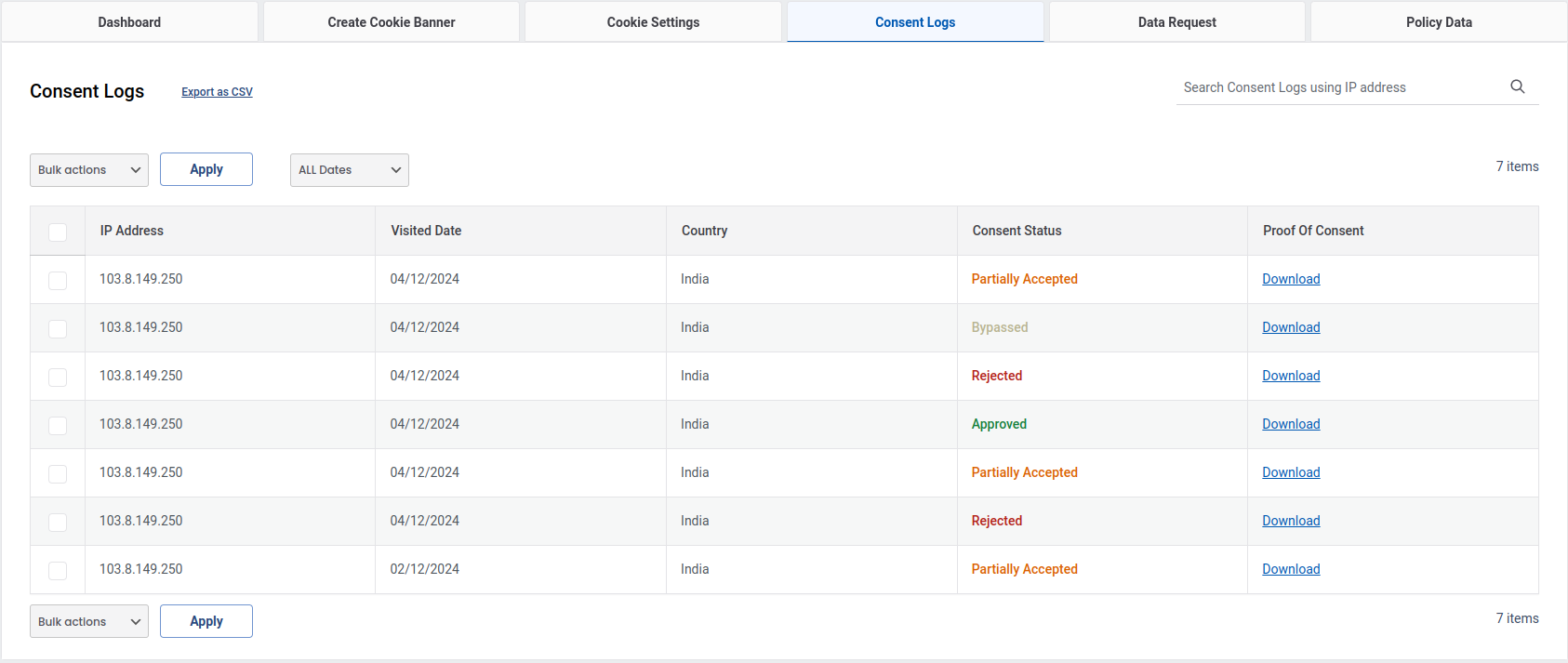
The plugin can store consent-related information such as:
-
Consent status by category
-
Date and time of interaction
These records are stored on your website and can be used for reference or internal review purposes.
Supported Privacy Regulations
WPLP Cookie Consent is built to support a wide range of privacy and data protection regulations, including:
-
GDPR and ePrivacy Directive (European Union)
-
CCPA and CPRA (United States)
-
LGPD (Brazil)
-
POPIA (South Africa)
-
PIPEDA (Canada)
-
UK GDPR and related frameworks
Setup and Compatibility
-
Guided setup to help configure basic consent settings
-
Compatible with popular themes and page builders
-
Works with WooCommerce, Google Tag Manager, and commonly used plugins
-
Translation-ready and compatible with multilingual plugins
Support & Documentation
Documentation and setup guides are available to help configure the plugin.
For questions related to features or compatibility, you can contact the WPLP Legal Pages support team.
Part of the WPLP Compliance Platform
WPLP Cookie Consent integrates with the WPLP Compliance Platform to support broader privacy management workflows, including cookie policy generation and legal page management.
Additional features are available in premium plans. Details about available plans and features can be found on the pricing page.
Disclaimer
This plugin provides tools to help manage cookie consent and related settings. It does not guarantee compliance with any specific law or regulation. Website owners are responsible for ensuring their sites meet applicable legal requirements.
Capturas
Escritorio 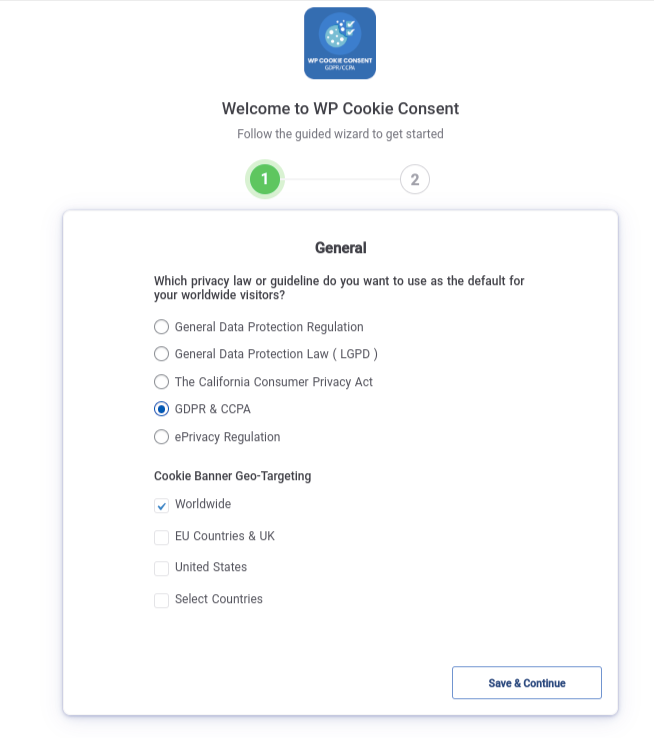
Wizard Section1 
Wizard Section2 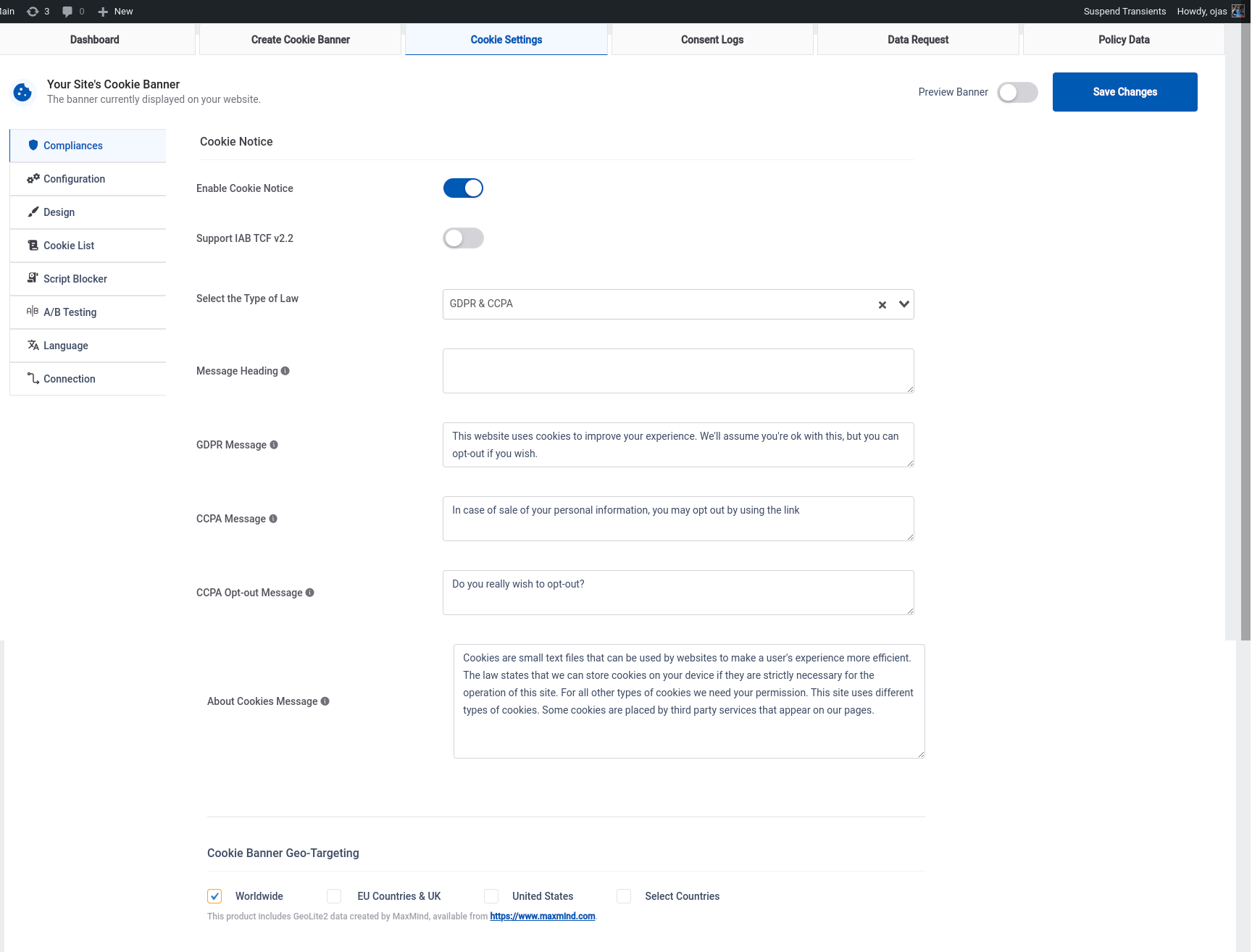
Cookie Setting 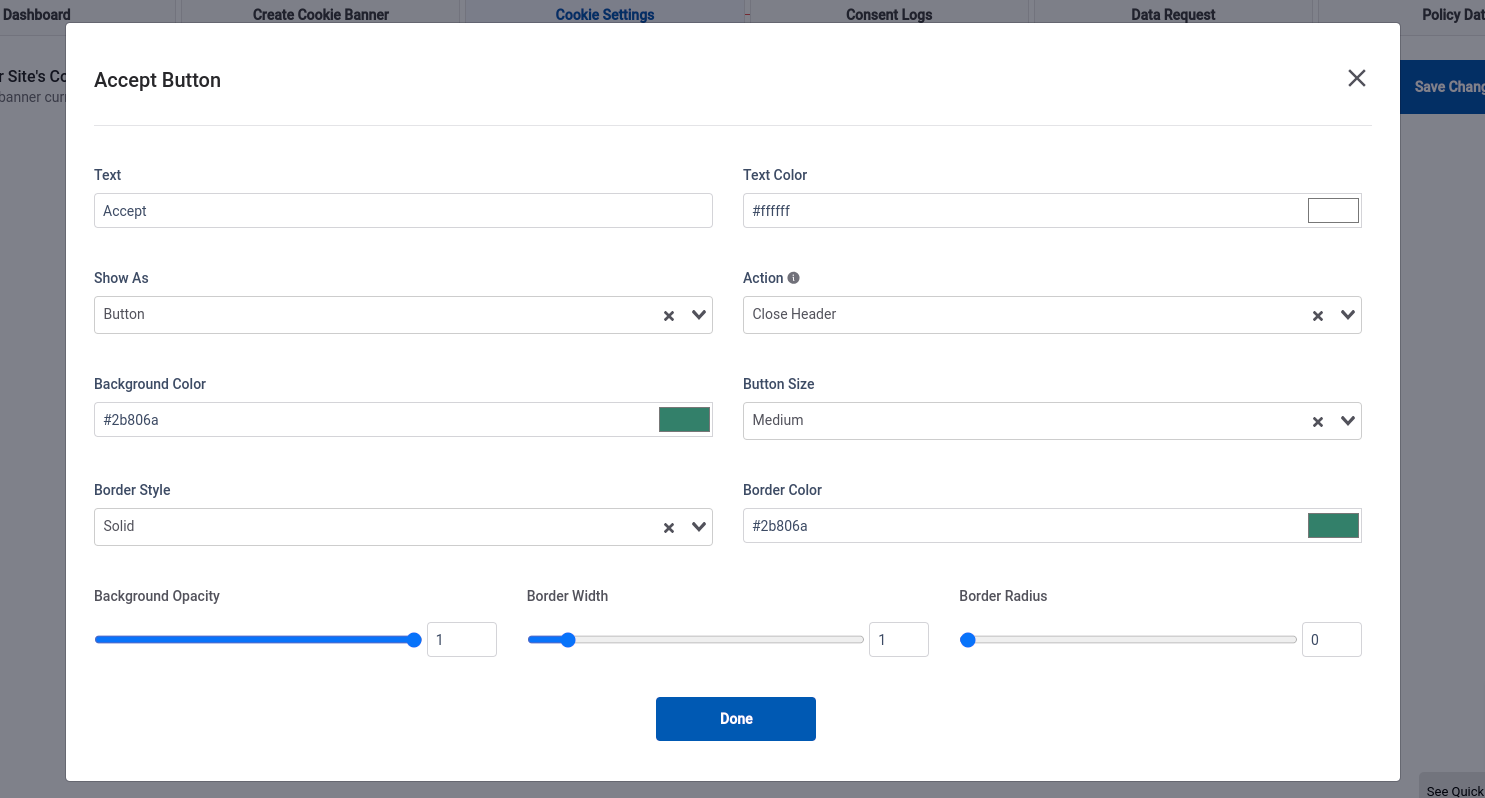
Banner buttons Customization 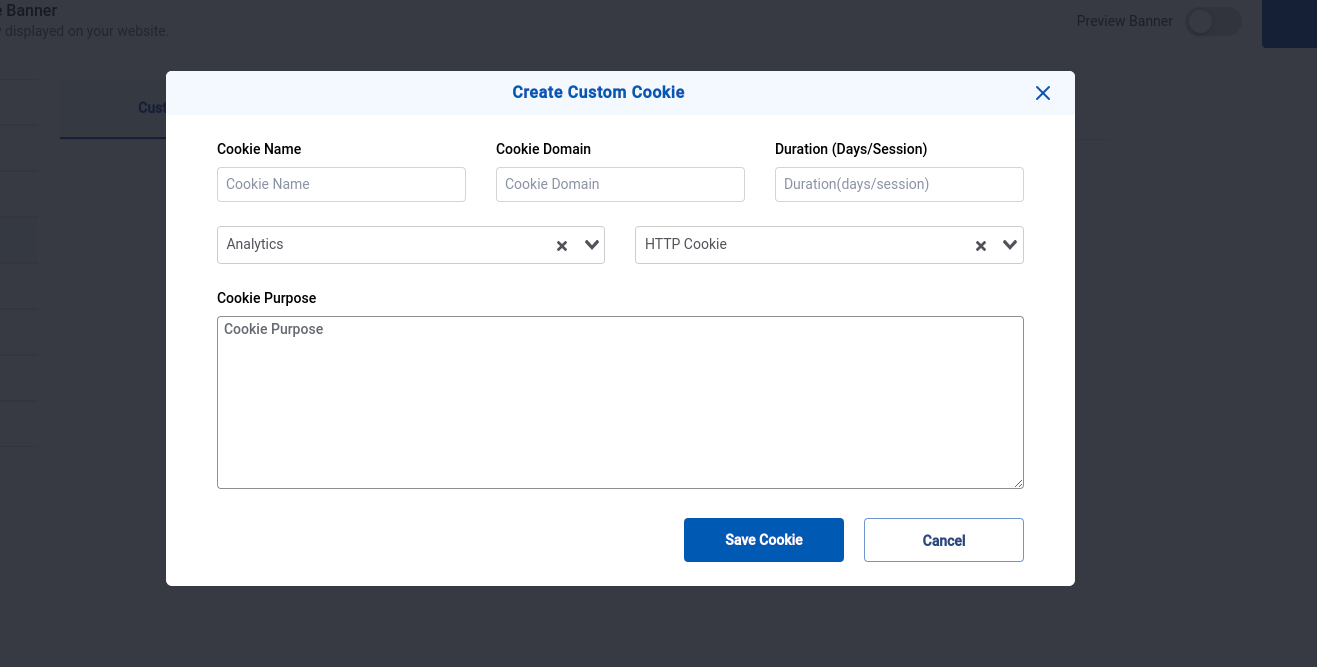
Create Custom Cookie 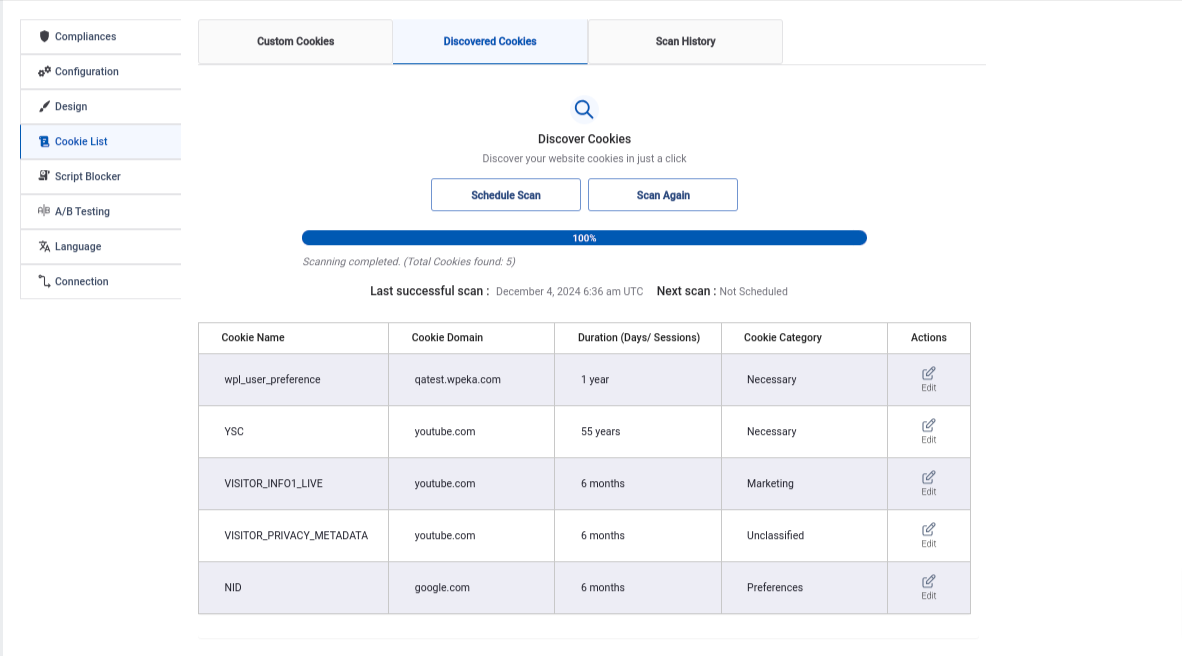
Cookie Scanning and Discovered Cookies 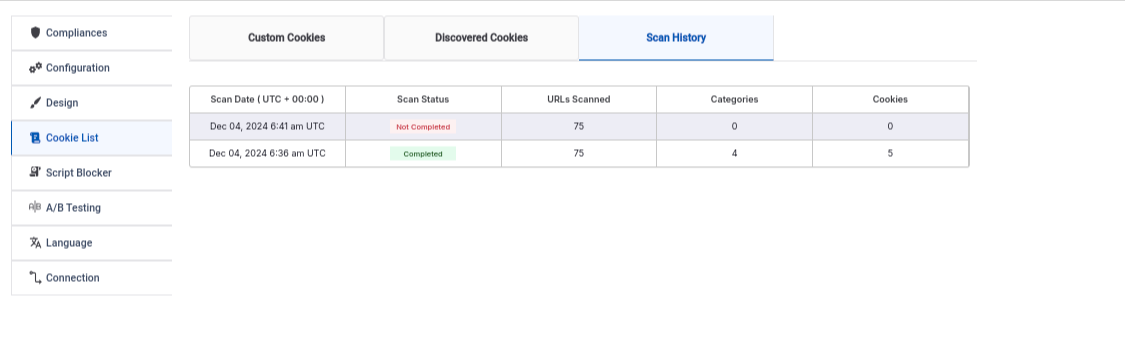
Scan History 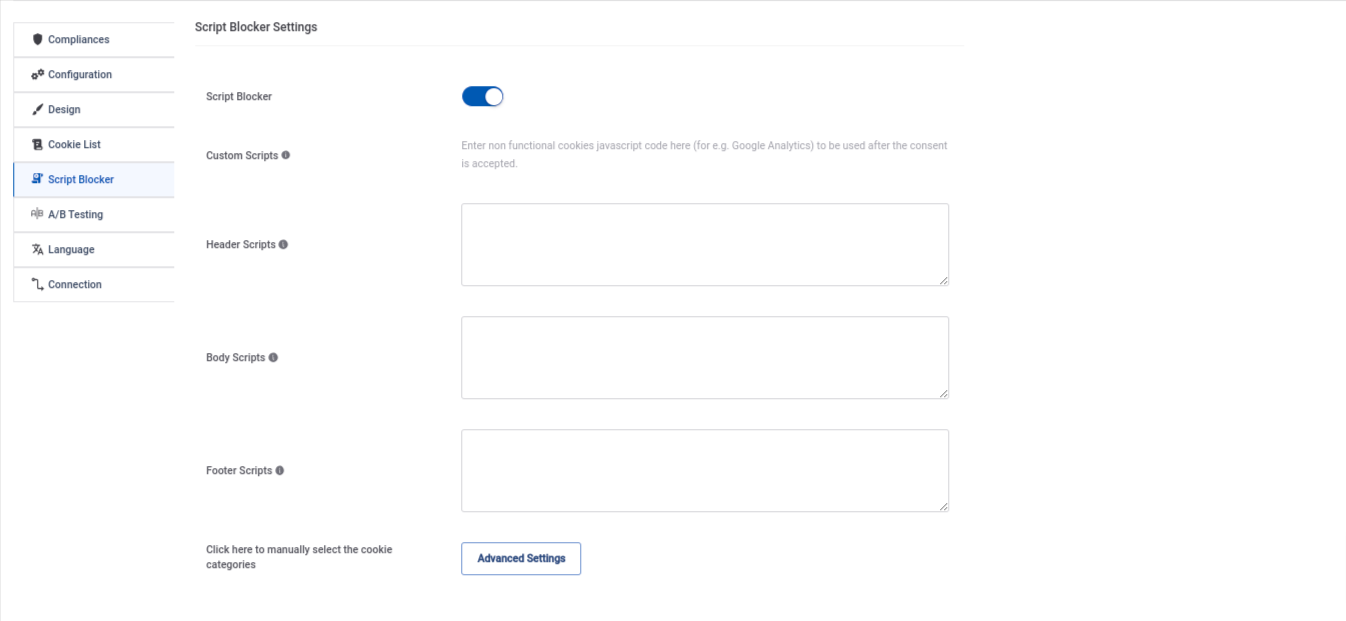
Script Blocker 10.A-B testing 11.Consent Log table 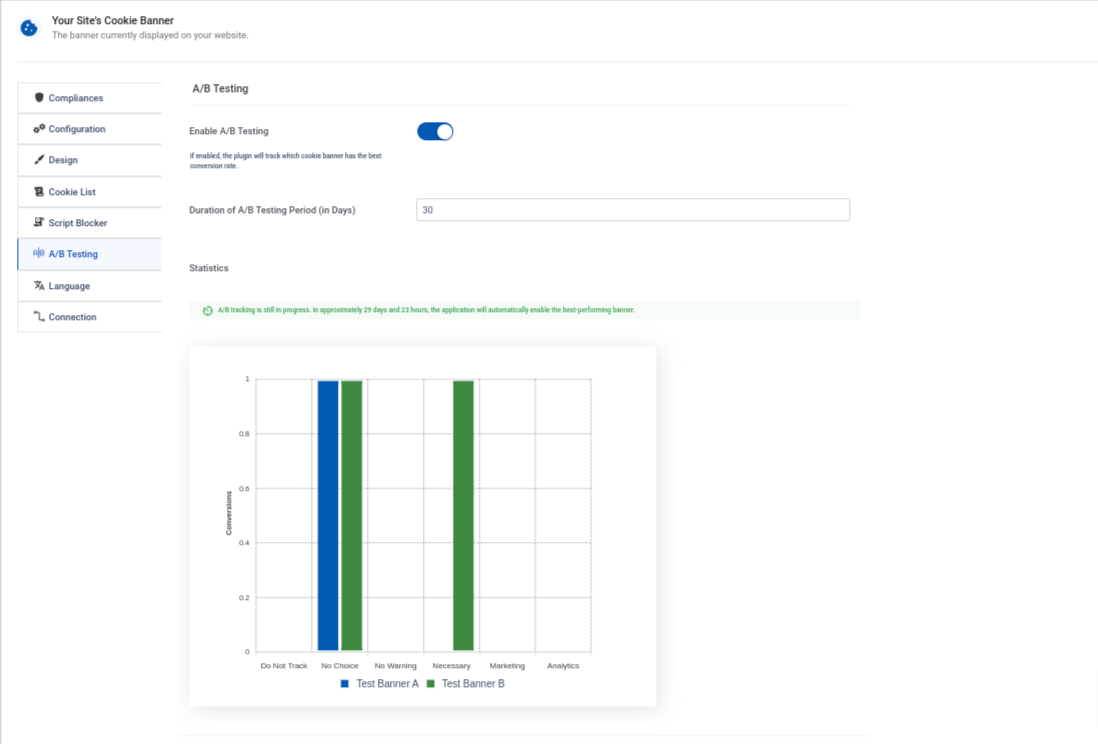
Bloques
Este plugin proporciona 2 bloques.
- WPLP Cookie Policy Details
- WPLP Autoupdate Cookies List
FAQ
-
You can find the official documentation for WPLP Cookie Consent here: WPLP Cookie Consent Documentation.
This comprehensive guide covers everything from installation and setup to advanced features, ensuring you can easily configure the plugin to meet your compliance needs. 🚀
-
The free version allows you to scan your website for cookies, generate a basic cookie consent banner, and display it with unlimited pageviews.
It’s an excellent choice for websites with minimal cookie usage and straightforward compliance needs.
-
The plugin simplifies cookie consent management by helping you obtain and record user consent, ensuring compliance with GDPR, CCPA, and other privacy regulations. This helps you avoid potential legal risks and fines.
-
Once the scan is finished, the plugin categorizes detected cookies by type and purpose (e.g., essential, analytics, marketing). This classification allows you to provide transparent information to users in your cookie consent banner.
-
What details are stored in the consent log?
-
The consent log records important user consent data, including the date and time of consent, the user’s IP address, and the specific cookie categories they agreed to. This helps you maintain compliance records for legal audits.
-
Geo-targeting enables you to tailor your cookie consent banner based on a visitor’s location. For example, users in the EU can see a more detailed banner to comply with GDPR, while visitors from other regions may see a simplified version.
-
The plugin includes a step-by-step setup wizard that guides you through configuring your cookie consent banner. By answering simple questions about your website’s cookie usage, the wizard automatically creates a compliant and customized banner.
-
Yes! The wizard provides an initial setup, but you can customize the banner’s design, text, and functionality anytime from the plugin settings.
-
Absolutely! The plugin offers multiple pre-designed templates and customization options. You can modify the banner’s colors, fonts, button styles, and layout to align with your website’s branding.
-
The plugin scans your website to detect all cookies, including those set by third-party scripts. It then provides a detailed breakdown, allowing you to categorize and manage them for compliance.
-
Yes! You can set a delay for the banner’s appearance or configure it to auto-hide after a certain period, ensuring it doesn’t disrupt the user experience.
-
No. Solo se cargarán las cookies «Necesarias» hasta que el usuario dé su consentimiento.
-
¿Con qué normativas de privacidad ayuda este plugin?
-
El plugin ha sido diseñado para ayudar con las siguientes leyes de cookies, reglamentos de privacidad y actas de protección de datos:
– RGPD (UE): El reglamento general de protección de datos
– CCPA (California, Estados Unidos): El acta de privacidad del consumidor de California
– PIPEDA (Canadá): El acta de protección de la información personal y los documentos electrónicos
– AAP (Australia): Los principios de privacidad de Australia
– LGPD (Brasil): La ley general de protección de datos de Brasil
– DSGVO, DPA, PECR, CNIL y otros datos, reglamentos de privacidad y leyes de cookies -
Does it block 3rd party resources loaded via iFrames (such as YouTube)?
-
Sí, tiene un bloqueador de iFrames: Los datos de los usuarios no son rastreados a través de los iFrames, salvo que den su consentimiento. Los usuarios pueden elegir qué categoría de cookies quieren permitir.
-
Yes, the plugin supports multiple languages, ensuring that your cookie consent banner is displayed in the visitor’s preferred language for better accessibility and compliance across different regions.
Reseñas


Colaboradores y desarrolladores
«Cookie Banner for GDPR / CCPA – WPLP Cookie Consent» es un software de código abierto. Las siguientes personas han colaborado con este plugin.
Colaboradores
«Cookie Banner for GDPR / CCPA – WPLP Cookie Consent» ha sido traducido a 14 idiomas locales. Gracias a los traductores por sus contribuciones.
Traduce «Cookie Banner for GDPR / CCPA – WPLP Cookie Consent» a tu idioma.
¿Interesado en el desarrollo?
Revisa el código , echa un vistazo al repositorio SVN o suscríbete al registro de desarrollo por RSS.
Registro de cambios
4.2.9
- New Features
- Added a Gutenberg block to automatically display the scanned cookies table on the Cookie Policy page, making updates seamless and dynamic.
- Introduced an option to show “Revoke Consent” as an icon, improving visibility and user accessibility.
- Added Reject and Accept All buttons in the Cookie Settings popup to align with GDPR requirements.
- Improvements
- Refactored the Cookie Scanner script for better performance and reliability.
4.2.8
- Fixed script blocker conflicts affecting Elementor youtube embeds.
- Fixed import/export settings sync issues between plugin and SaaS.
- General bug fixes and performance improvements.
4.2.7
- Bug Fixes
- Fixed an issue where invalid JSON uploads (including unsupported formats like CSV or malformed JSON files) did not trigger an appropriate error message during import.
- Fixed a translation issue where cookie settings popup content was not correctly translated in Preview mode.
4.2.6
- Added WP Cookie Consent features to SaaS: Schedule Scan and Restore to Default.
- Implemented support for IAB TCF v2.3 compliance.
4.2.5
- Improved performance with IAB TCF enabled: Resolved an issue where enabling IAB TCF caused slow loading and impacted overall website performance.
- Fixed Cookie Settings Export/Import (SaaS Dashboard): Addressed a bug where exporting and importing cookie settings was not functioning correctly within the SaaS dashboard.
- Resolved Sidebar Widget Saving Issue: Fixed a conflict where sidebar widgets failed to save when WP Legal Pages was used alongside popular WordPress themes.
4.2.4
- Bug fixes and Improvements.
4.2.3
- Fixed minor issues with IAB TCF
4.2.2
- Fixed issues in the Revoke Consent flow.
- Improved Google Analytics cookie categorization.
- Fixed issues related to A/B testing.
- Resolved minor bugs.
4.2.1
-
Bug Fixes
- Fixed incorrect statistical percentage calculations in the GDPR module.
- Resolved issue where Cookie Consent import/export feature was not working properly.
- Fixed Safe Mode and Script Blocker settings not saving their state.
- Fixed issue where selecting a cookie banner template with a logo did not provide an option to remove the logo.
- Resolved JSON validation issue that was breaking the Advanced Settings page and causing console errors.
-
Improvements
- Improved Cookie Scanning Email Report:
- Updated design to better match order completion-style email layout.
- Added cookie scanning summary details including:
- Scan date
- Scanned URLs
- Categories
- Cookies
4.2.0
- Enhanced App Dashboard: Added Cookie Settings, allowing you to choose the banner template, layout, and design directly from the WPLP SaaS dashboard.
4.1.3
- Bug fixes and Improvements.
4.1.2
- Bug fixes and Improvements.
4.1.1
- Modified code as per org guidelines.
4.1.0
- Bug fixes and Improvements.
4.0.9
- Added more cookie consent settings to the WPLP SaaS dashboard, giving you better control without switching back to WordPress
- Improved sync and stability between the WPLP Cookie Consent plugin and the WPLP Compliance Platform
- Fixed minor bugs and made overall performance and reliability improvements
4.0.8
- Few bug fixes and improvements
4.0.7
- Improved SaaS App Experience: We’ve upgraded the SaaS platform for better performance, faster loading, and a cleaner interface. Managing your compliance setup is now simpler and more organized.
- DSAR Management Added to SaaS: You can now view and manage Data Subject Access Requests directly from the SaaS dashboard. No need to jump between tools – everything is in one place.
- Consent Log Access in SaaS: Consent records are now available inside the SaaS app. You can view user consent details and stay audit-ready without relying only on WordPress.
- Privacy Policy Data in SaaS: Your privacy policy details are now synced with the SaaS platform, making it easier to review, manage, and update critical data.
4.0.6
- Fixed issue with Revoke content button color
- Fixed minor issue with IAB
4.0.5
- Improvements: Integrated updates to support the saas dashboard experience.
4.0.4
- Security Improvements: We’ve fixed a reported vulnerability to make sure your site stays secure and protected.
- Helpful Docs Added: A few settings now have quick documentation links – so you can get guidance right where you need it, without hunting around.
- Bug Fixes & Tweaks: We squashed some bugs and made a few behind-the-scenes improvements to keep things running smoothly.
4.0.3
- Improved Cookie Scanner: The scanner now runs in the background and automatically emails you a detailed summary once the scan is complete, making cookie detection faster, hands-free, and more convenient.
- Minor bug fixes and improvements.
4.0.2
- Minor bug fixes and improvements.
4.0.1
- Bug fixes and improvements.
4.0.0
- Major Update – Revamped Dashboard & Settings
- Completely redesigned dashboard UI for a cleaner, more intuitive experience.
- Restructured menu navigation to make key features easier to find.
- Simplified and reorganized settings pages for faster configuration.
- Improved layout consistency across all modules for better usability.
- Bug fixes and improvements.
3.9.8
- Added option to display CCPA and GDPR banners separately: Now, site owners can configure banners to show individually based on user region, ensuring a smoother and more compliant user experience.
- Minor bug fixes and improvements.
3.9.7
- Added two new cookie banner templates.
- Fixed: Debug log warnings.
- Fixed: Policy details block name.
3.9.6
- Fixed: Issue with user consent
- Fixed: IP addresses not visible in consent log
3.9.5
- Minor bug fixes and improvements.
3.9.4
- Fixed: A/B Testing functionality not working on Bluehost sites.
- Fixed: Button size customization was not applied consistently to all buttons (Accept, Accept All, Decline, Cookie Settings).
- Fixed: PHP Notices and warning messages under GDPR settings.
3.9.3
- Fix: Minor changes.
3.9.2
- Fix: Bug fixes and improvements.
3.9.1
- Improvement: Improved functional cookie handling under Google Consent Mode (GCM) settings for better accuracy and categorization.
- Fix: Resolved accessibility issues to ensure better compliance with WCAG (Web Content Accessibility Guidelines).
3.9.0
- Revamped Cookie Banner Structure: All banner templates are now fully responsive and optimized to display perfectly across all devices and screen sizes.
- Fixed Google Consent Mode Checker Issue: Resolved an issue where the “Check Status” feature was not accurately reflecting implementation results. Now users get reliable feedback on their Consent Mode setup.
3.8.4
- Added email notification for Google Consent Mode implementation status: Users will now receive an email with the status details when they click the “Check Status” button in the plugin. This helps you stay informed and take quick action if anything needs fixing.
3.8.3
- Improvement: Minor improvements.
- Improvement: Improved performance affecting page load speed.
- Fix: Fixed minor translation issue.
3.8.2
- Fix: Fixed minor issue with Maxmind integration.
3.8.1
- Improvement: Option to define dependencies between scripts for improved integration and script loading control.
- Fix: Bug fixes, code improvements, and enhanced security.
3.8.0
- Google Consent Mode – Debug Mode: Added a dedicated debug mode to test and verify GCM behavior. Easily inspect consent signals and integration status during setup.
- GCM Status Checker: Instantly view whether Google Consent Mode is active and functioning correctly on your site with the new status checker tool.
- Advertiser Consent Mode (Pro): Pro users now have access to Advertiser Consent Mode, helping you stay compliant with evolving ad tech requirements while retaining ad tracking capabilities.
- WP Consent API Compatbility: Added support for the WordPress Consent API to help improve compatibility with third-party plugins and services requesting user consent.
3.7.9
- Improvement: We’ve refreshed the look and feel of cookie banners to make them cleaner, more modern, and user-friendly.
- Fix: Minor bug fixes and performance improvements to ensure smoother operation and better stability.
3.7.8
*Added support for Google Consent Mode (v2): Easily integrate Google Consent Mode with your cookie banner to ensure compliance and accurate tracking based on user consent.
* Fix: Bug fixes and improvements.
3.7.7
- Fix: Bug fixes and improvements.
3.7.6
- Improvement: Revamped the menu structure for a more intuitive and seamless user experience.
- Fix: Bug fixes and improvements.
3.7.5
- Improvement – Optimized code for revamped banners to improve performance and maintainability.
3.7.4
- Fix – Minor bug fixes and improvements
3.7.3
- Enhanced Performance – Optimized the plugin for better speed and efficiency, ensuring a smoother user experience.
- Google Additional Consent Mode Support – Added support for Google’s Additional Consent Mode, helping users manage consent for ad partners not covered by TCF.
3.7.2
- Enhanced – A/B Testing Algorithm – Improved the accuracy and performance of cookie banner A/B testing to deliver more reliable insights.
- Fix – Minor bug fixes within the plugin.
3.7.1.1
- Improvement – Minor bug fixes and improvements.
3.7.1
- Improvement – Redesigned and improved few existing templates for a modern and user-friendly look.
- Improvement – Optimized codebase for faster loading times and smoother operation.
3.7.0
- Feature – Introduced a Unified Dashboard for managing WPLP Cookie Consent and WP Legal Pages, providing a seamless interface, improved navigation and enhanced user experience.
3.6.8
- New Feature: Added an option to auto-generate cookie banner colors based on your website’s color scheme, ensuring a seamless look and feel.
- Enhancements: Minor bug fixes and performance improvements for a smoother user experience.
3.6.7
- Feature – Introduced a step-by-step plugin tour for improved onboarding and ease of use.
- Feature – Added feature to automatically start scanning for cookies upon plugin activation. The scan progress is now visible in both the Menu and Scanner tabs.
- Fix – Minor bug fixes to improve overall plugin performance and stability.
3.6.6
- Feature – Added Cookie Banner Pageviews feature to track cookie banner performance by monitoring pageviews.
- Feature – Added feature to clear cookies before a new scan to ensure more accurate scan results.
- Fix – Minor bug fixes to improve overall plugin performance and stability.
3.6.5
- Feature – Support multiple legislation on same website.
- Feature – Added feature to set the language based on user prefered browser language.
- Fix – Fixed issue with Do Not Track.
- Fix – Improved performance of the plugin.
- Fix – Minor bug fixes within the plugin.
3.6.4
- Fix: UI improvements and bugs fixes within the plugin.
3.6.3
- Fix: Further enhanced the admin interface.
3.6.2
- Fix: Banner initialization delay now doesnot prevent hide cookie banner setting on certain pages.
- Fix: Bulk Action in Consent Logs and Data Policy fixed.
- Fix: Consent log also works now with auto-click & auto scroll accept.
- Fix: Date(month) filter in policy data & consent logs tab fixed.
- Corrección: Corregidos fallos menores en el plugin.
- Improvement: User is now prompted to scan the website for cookies again when third party plugins are enabled/disabled.
3.6.1
- Fix: Optimized code for better performance
3.6.0
- Feature: Changes in maxmind integration so that now users do not need to put their maxmind API key. This product now includes GeoLite2 data created by MaxMind, available from https://www.maxmind.com.
- New Feature: Added translation support for 15 more languages.
3.5.1
- Fix: Minor bug fixes and improvements.
3.5.0
- Feature: IAB TCF Support: The plugin now supports the Interactive Advertising Bureau Transparency & Consent Framework (IAB TCF), allowing website owners to comply with strict data privacy regulations.
3.4.4
- Feature: Unified Dashboard: The “WP Legal Pages” menu item now serves as a central hub for managing both WP Legal Pages and WPLP Cookie Consent, streamlining the user experience.
3.4.3
- Update: Refactored CSS architecture for better modularity and maintainability.
3.4.2
- New Features: Multi-Country Geo-Targeting: Added support for selecting multiple countries in the cookie banner geo-targeting settings. This allows for more precise targeting of visitors based on their location.
- New Feature: Added translation support for 78 languages.
3.4.1
- New Feature: A/B Testing: Introduced A/B testing capabilities for cookie banners, allowing users to experiment with different banner designs and content to optimize user engagement and consent rates.
- Bug Fixes: Implemented several under-the-hood improvements to enhance plugin stability and performance.
3.4.0
- Major Update: We’ve completely revamped the interface to make it more intuitive, user-friendly, and efficient.
- Fix: Minor bug fixes and improvements.
3.3.2
- Corrección: Corregidos fallos menores en el plugin.
3.3.1
- Corrección: Corregidos fallos menores en el plugin.
3.3.0
- Feature: Enhanced Customization: You can now customize the background color of the “Revoke Consent” button for a more cohesive design with your website’s theme.
- Feature: Portuguese Language Support: We’re happy to announce support for the Portuguese language! This allows you to display your cookie consent message in Portuguese, catering to a wider audience.
- Update: This update includes security fixes and improvements to ensure your website remains protected.
3.2.0
- Feature: Enhanced Cookie Scanning: We’ve introduced a new shortcut button directly in your top WordPress menu bar. With a single click, you can now scan any page on your website for cookies used, along with the cookie banner activation status and script blocker status.
- Feature: Live Banner Preview: Enjoy a more dynamic experience with the real-time preview of your chosen banner template. See how your website will look with the selected design without saving changes.
- Feature: Comprehensive Preview: Gain a complete picture! The banner preview now includes a view of the preference center along with the cookie banner itself. Visualize the entire user experience for managing cookie consent.
- Corrección: Corregidos fallos menores en el plugin.
3.1.0
- Feature: Added translation support for Polish language.
- Corrección: Corregidos fallos menores en el plugin.
3.0.2
- Feature: Added translation support for Hungarian language.
- Corrección: Corregidos fallos menores en el plugin.
3.0.2
- Feature: Added translation support for Hungarian language.
- Corrección: Corregidos fallos menores en el plugin.
3.0.1
- Corrección: Corregidos fallos menores en el plugin.
3.0.0
- New: With this update, we’ve added Pro features like script blocker, premium cookie banners, consent log, and more. Update now to unlock them!
- New: Now you can also connect your site to WPLP Cookie Consent for cookie scanning, geo-targeting, and an advanced dashboard.
- Corrección: Corregidos fallos menores en el plugin.
2.6.1
- Corrección: Corregidos fallos menores en el plugin.
2.6.0
- Feature: Respect Do Not Track & Global Privacy Control: Prioritize user privacy by respecting Do Not Track settings and Global Privacy Control.
- Feature: Hide Cookie Banner on Specific Pages: Selectively hide the cookie banner on specific pages for a more tailored user experience.
- Feature: Feature: Import Settings: Easily import cookie banner settings, streamlining workflow and ensuring consistency.
- Feature: Font Options: Customize typography effortlessly with new font options.
- Feature: Upload Logo: Personalize branding by uploading your logo directly to your cookie banner.
- Feature: Add Custom CSS: Unleash creativity with the ability to add custom CSS to your cookie banner.
- Corrección: Corregidos fallos menores en el plugin.
2.5.2
- Corrección: Corregidos fallos menores en el plugin.
2.5.1
- Fix: Minor bugs fixed within plugin and UI Enhancements.
2.5.0
- Feature: Revamped UI: Submenus are now organized into tabs for easier navigation to configurations.
2.4.1
- Corrección: Corregidos fallos menores en el plugin.
2.4.0
- Feature: LGPD : Added new options to comply with LGPD law.
- Corrección: Corregidos fallos menores en el plugin.
2.3.9
- Corrección: Corregidos fallos menores en el plugin.
2.3.8
- Corrección: Corregidos fallos menores en el plugin.
2.3.7
- Corrección: Correcciones de fallos menores.
2.3.6
- Update: Compatibility with WP 6.4
- Feature: Added option to export and erase personal data.
- Fix: Bug fixes and improvements.
2.3.5
- Corrección: Corregidos fallos menores en el plugin.
2.3.4
- Feature: Introducing: 2 Additional Widget Styles for Cookie Banners
- Corrección: Corregidos fallos menores en el plugin.
2.3.3
- Corrección: Corregidos fallos menores en el plugin.
2.3.2
- Feature: Enhanced Language Support: Now offering translation support for an extended range of 10 languages for your cookie consent banner content.
2.3.1
- Feature: Preview your website’s cookie consent banner directly within the WordPress dashboard as you make changes.
2.3.0
- Feature: Streamlined cookie consent banner setup with a new Getting Started Wizard.
2.2.9
- Corrección: Corregidos fallos menores en el plugin.
2.2.8
- Corrección: Corregidos fallos menores en el plugin.
2.2.7
- Corrección: Corregidos fallos menores en el plugin.
2.2.6
- Fix: Fixed CSV injection vulnerability in admin area.
2.2.5
- Corrección: Corregidos fallos menores en el plugin.
2.2.4
- Fix – Allowed HTML in consent message.
2.2.3
- Update – Compatibility with WP 6.1
2.2.2
- Feature – Changes for Pro version compatibility
2.2.1
- Fix – Compatibility with WP 6.0
- Fix – Disabled Auto Hide milliseconds feature for CCPA.
- Feature – Added option to add custom text for CCPA opt-out message.
- Feature – Added admin strings translation compatibility with WPML.
2.2.0
- Corrección: Botón «Aceptar todo».
- Característica: Animación para el banner de cookies al cargar.
- Característica: Aceptar las cookies al hacer clic.
2.1.7
- Corrección: Traducciones de cadenas
2.1.6
- Corrección: No funcionaba la visualización de la acreditación.
- Corrección: Formato de categoría de cookies y recuento de cookies.
- Corrección: No funcionaba el banner de cookies en la portada.
2.1.5
- Corrección: No se podía hacer clic en el botón de rechazar los ajustes de cookies. Los ajustes de rechazar las cookies no se mostraba en la ventana emergente.
2.1.4
- Corrección: Corregido el código del plugin según los estándares de WP y PHPCS.
2.1.3
- Corrección: Corregido el código del plugin según los estándares de WP y PHPCS.
2.1.2
- Corrección: Corregido el código del plugin según los estándares de WP y PHPCS.
2.1.1
- Actualización: Eliminada la biblioteca de análisis.
2.1.0
- Actualización: Cambios en la interfaz de usuario en la página de ajustes.
- Actualización: Cambios en la interfaz de usuario en la página del escritorio (Primeros pasos).
- Característica: Botón «Aceptar todo» en el banner de cookies.
- Corrección: Correcciones en la codificación de los valores de cookies.
2.0.7
- Corrección: Correcciones de compatibilidad con la versión Pro.
2.0.6
- Corrección: Corregido el código del plugin según los estándares de WP y PHPCS.
2.0.5
- Corrección: Corrección de un fallo relacionado con el problema de visualización de ventanas emergentes con conflictos de temas.
2.0.4
- Actualización: Biblioteca de análisis actualizada por problemas de compatibilidad con PHP 8.
- Corrección: Corregidos fallos menores en el plugin.
2.0.3
- Corrección: Corrección de un fallo relacionado con el objetivo geográfico de MaxMind para la barra de aviso del RGPD y CCPA.
2.0.2
- Corrección: Corregidos los problemas de conflictos con la portada de la interfaz de usuario del tema.
2.0.1
- Característica: Posibilidad de excluir páginas y/o entradas durante la exploración de la web en busca de cookies.
2.0.0
- Corrección: Corregidos los problemas de accesibilidad del contenido web.
1.9.9
- Corrección: Corregidos fallos menores del plugin para compatibilidad con la última versión de WordPress.
- Corrección: Corregido un problema con la URL del enlace para los botones de aceptar y rechazar.
1.9.8
- Corrección: Corregido un problema de conflicto con el JavaScript de Bootstrap.
1.9.7
- Corrección: Corregido un problema de vulnerabilidad para la analítica dentro del plugin.
1.9.6
- Actualización: Actualizados los enlaces en el plugin.
- Actualización: Añadido el enlace «Actualizar a Pro» en la página del plugin.
1.9.5
- Corrección: Corrección importante para la visualización de la información de las cookies en la tabla.
1.9.4
- Característica: Añadidas plantillas prediseñadas para el aviso de consentimiento de cookies.
- Característica: Añadidos diseños prefabricados para el aviso emergente de los ajustes de cookies.
- Característica: Añadidas opciones para el borde para el aviso de consentimiento de cookies y botones.
- Actualización: Aviso para rastrear los análisis de uso del plugin.
- Actualización: Añadida una mascota de ayuda en el plugin.
1.9.3
- Corrección: Problemas de conflictos en el formulario de comentarios de desactivación.
- Corrección: Problema menor de conflicto del plugin.
- Corrección: Problema con la creación de una tabla necesaria al activar el plugin.
1.9.2
- Corrección: Corregidos los problemas de conflictos del tema.
1.9.1
- Corrección: Corrección menor del plugin para ocultar/mostrar la ventana emergente en caso de geolocalización.
- Actualización: Traducciones de idiomas del plugin.
1.9.0
- Característica: Actualizado el plugin actualizado para resolver el aviso de cookies de ePrivacy.
- Característica: Añadidos al plugin los ajustes de bloqueo de scripts personalizados.
- Característica: Añadidos los ajustes para borrar los datos del plugin al desactivarlo.
- Característica: Añadida la opción para seleccionar la página de WordPress para el enlace «Leer más» y sincronización con la página de la política de privacidad de WordPress.
1.8.9
- Corrección: Obsoleta la sintaxis de llaves.
- Corrección: Conflictos en la portada con el nombre de una clase CSS.
1.8.8
- Característica: Añadida compatibilidad para IAB Transparency and Consent Framework (TCF).
1.8.7
- Característica: Añadida compatibilidad con WPML.
- Actualización: Traducciones de idiomas.
- Actualización: Accesibilidad del teclado.
- Corrección: Problema de consultas lentas al actualizar los módulos de administración/público en la tabla de opciones.
1.8.6
- Actualización: Compatibilidad con WordPress 5.4.1.
- Corrección: Problema en la creación de las tablas de la base de datos en la activación del plugin.
1.8.5
- Característica: Actualizado el plugin para dirigir al RGPD y la CCPA según la ubicación del usuario.
- Actualización: Mejorado el rendimiento del plugin.
1.8.4
- Actualización: Añadida la página de primeros pasos.
- Característica: Añadido un bloque de Gutenberg para los detalles de las cookies.
1.8.3
- Corrección: Problema con la funcionalidad de la opción para guardar la caducidad de las cookies y el botón de ajustes.
- Corrección: La visualización de la barra de cookies en la portada cuando está activo el plugin Pro.
1.8.2
- Corrección: Mejora de la portada para el aviso de la CCPA.
1.8.1
- Característica: Actualizado el plugin para atender los requisitos «No vender» de la CCPA.
- Característica: Opción añadida para recargar la página después de aceptar el aviso.
- Característica: Opción de establecer el tiempo de caducidad de las cookies para el consentimiento del RGPD dado por los usuarios.
- Característica: Opción para establecer un intervalo al scroll.
1.8.0
- Corrección: Problema relacionado con el marcado automático para las cookies no necesarias.
1.7.9
- Característica: Aceptar automáticamente el consentimiento de cookies al hacer scroll y cerrar el aviso de cookies (opción para configurar – permitido en algunos países).
- Característica: Ocultar automáticamente el aviso de cookies después de un retardo (puede ser configurado).
- Característica: Proporcionar la opción para que el usuario cambie su consentimiento anterior.
1.7.8
- Actualización: Mejoras en el diseño de la visualización del aviso de cookies.
1.7.6
- Característica: Añadidas varias opciones para mostrar el aviso de consentimiento de cookies en la portada – Banner/Mensaje emergente/Widget.
- Característica: Añadida la opción de opacidad para el aviso del consentimiento de cookies.
- Característica: Opciones de personalización para el botón de ajustes de las cookies.
- Actualización: Mostrar los detalles del consentimiento de cookies para las categorías en un mensaje emergente en la portada.
- Actualización: Traducciones actualizadas.
- Actualización: Hecha la compatibilidad con WordPress 5.3.2.
1.7.5
- Corrección: Problemas de traducción en la portada para las categorías y la descripción de las cookies.
1.7.4
- Característica: Añadida la posición de la barra de cookies.
- Actualización: Mejora de la interfaz de usuario de la barra de cookies en la portada.
1.7.3
- Actualización: Actualizadas las traducciones de idiomas.
1.7.2
- Corrección: Error fatal si el SDK de Analytics está incluido en dos o más plugins.
1.7.1
- Corrección: La URL de «Leer más» no se muestra en el escritorio de administración.
1.7
- Característica: Formulario de comentarios al desactivar el plugin.
1.6
- Corrección: Correcciones de fallos menores.
- Actualización: Añadida compatibilidad para `SCRIPT_DEBUG`.
1.5
- Actualización: Botón de «Aceptar todo» en la barra de consentimiento.
1.4
- Característica: Botón de «Aceptar todo» en la barra de consentimiento.
- Actualización: Hecho compatible con WordPress 5.2.3.
1.3
- Feature: custom post type for Cookie Policy Data
1.2
- Corrección: Problema de migración de los ajustes anteriores.
1.1
- Corrección: Problema con los ajustes de la versión anterior (con respecto a la versión Pro).
1.0
- Versión inicial.